

Knowledge Base
LLMs are usually trained with general knowledge and information from public sources such as Wikipedia. However, AI assistants often require specific information, e.g. a restaurant's opening hours, its address, etc.
This external information can be provided to the AI assistant in two ways:
- If the information is relatively small, it can be provided directly as a prompt.
- If the information is large (e.g. manuals or FAQs as PDF files), it can be added to the assistant's Knowledge Base.
How To Use The Knowledge Base
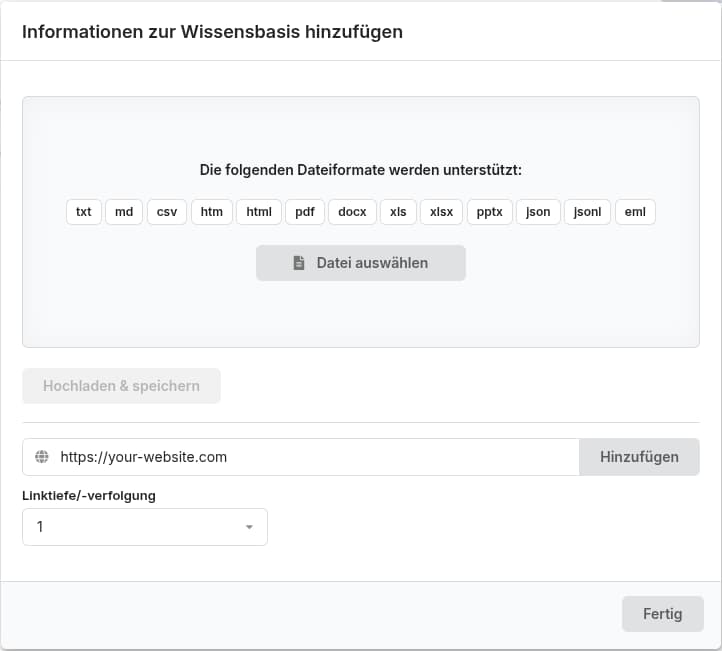
To use larger amounts of information such as PDFs or Word documents, simply upload the file to the Knowledge Base. VoiceBooker analyzes the uploaded document and adds it to its internal database so the information is available to the AI assistant later.
Alternatively, you can also import entire (company) websites. Provide the URL and choose how many levels (subpages) the import should follow.
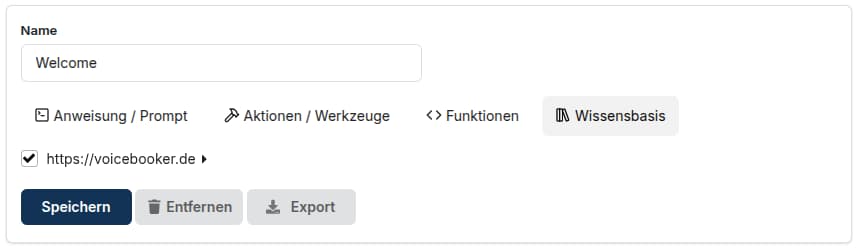
Associate the uploaded information with the stage where it should be available.
Programmatic Knowledge Base Lookup
function myFunc(params) {
    const result = kbLookup(["myFileInTheKnowledgeBase.pdf"], null);
    return({...params, data: `Answer the question using the following context: ${JSON.stringify(result)} and also mention the source.`});
}
Parameters
| Parameter | Description |
|---|---|
| sources | Array of filenames or URLs to search. An empty list searches across all documents in the Knowledge Base. |
| prompt (Optional) | The question/prompt to look up in the Knowledge Base. null uses the caller's latest input. |
The function kbLookup() returns the following array if it finds entries in the Knowledge Base that match the question:
[
{
"id": "gwebdhgrla",
"filename": "myFileInTheKnowledgeBase.pdf",
"cursor": 0,
"page": 100,
"text": "Kundenreaktionsmanagement\n\n\n Unser Ziel: Ihre Zufriedenheit.\n\n\n\nWir sind für Sie da\nÜber ein Lob oder Ideen, wie wir besser werden\nkönnen, freuen wir uns sehr.\n\nTeilen Sie uns auch mit, wenn Sie mit uns nicht\nzufrieden sind.\nIn jeder Agentur für Arbeit gibt es ein Kundenreaktions\n\nmanagement mit Ansprechpartnern. Gemeinsam\nsuchen wir nach einer Lösung Ihres Anliegens.\n\n\nSo erreichen Sie das Kundenreaktionsmanagement\nIhrer Agentur für Arbeit\n\n\n• Persönlich – fragen Sie in Ihrer Agentur für Arbeit\nnach der/dem Kundenreaktionsbeauftragten\n\n• Telefonisch – unter der Hotline 0800 4 5555 00\n\n(gebührenfrei). Fragen Sie nach der/dem\nKundenreaktionsbeauftragten Ihrer Agentur für Arbeit\n\n\n• Schriftlich – an Ihre Agentur für Arbeit\n\n• Online – unter » www.arbeitsagentur.de\n\n» Anregungen und Kritik oder nutzen Sie folgenden\nQR-Code zur Kontaktaufnahme\n\n\n\n\n\n\n\nHerausgeber\nBundesagentur für Arbeit\nZentrale / FGL31\n\n\nDezember 2024\n\n\nwww.arbeitsagentur.de\n\nHerstellung\n\nGGP Media GmbH, Pößneck"
}
]