
Take Message
The Take message function allows the AI assistant to record a classic voicemail, e.g. when specific staff members are unavailable. This ensures that important information is captured and forwarded to the appropriate person for follow-up.
How To Configure Message Recording
Message recordings are configured in the tools section of the AI assistant.
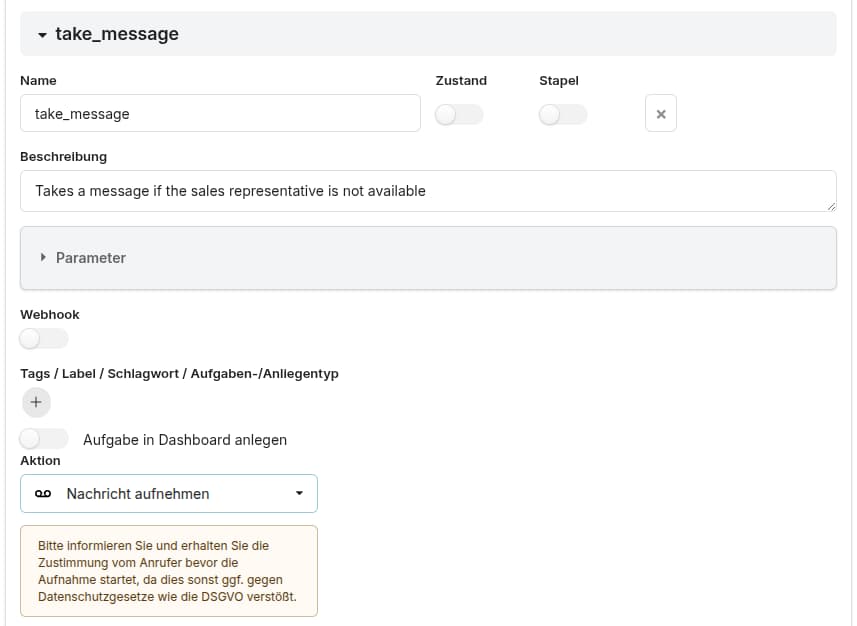
Define a new function and describe in the description under which conditions the recording should start.
Example: Call this function when the caller wants to talk to a sales representative. (if no one is currently available in the sales department).
Choose the action Take message as shown below:
Programmatic Message Recording
Message recording can also be started programmatically from any JavaScript code snippet by calling startRecording() as shown below:
function myFunction(params) {
    // ... some code ...
    startRecording();
    // ... some code ...
}
Note: Make sure to inform the caller and obtain their consent before starting a recording, as this may otherwise violate privacy laws (e.g. GDPR).