
Multi-Stage/Prompt-Bot
In this tutorial, we build a more complex assistant based on multiple stages.
Here you will learn:
- the difference between single- and multi-stage/prompt bots
- stage transitions
- how to access data extracted by the AI via the
paramsvariable
Why use multi-stage bots?
In theory, it is possible to create complex call flows with only one stage, i.e., just one prompt. However, LLMs sometimes hallucinate and take unexpected paths. They might make statements or ask questions that are not true, e.g., suggesting appointment slots that do not exist. To avoid this, we can use multiple stages, where each stage represents its own dialog in a call session. Each stage has its own prompt that is inserted during the conversation so we can instruct the LLM precisely what to do next.
An example based on appointment booking:
The assistant first asks the user/caller whether they want to book an appointment or cancel a booking. If the user wants to book an appointment, the assistant asks for the type of appointment and the desired day in the first stage, while the second stage collects all information about the person booking, e.g., name, email, phone number.
In the cancellation case, the bot first asks for the caller's name to identify the user, then retrieves existing bookings, lists them, and asks which specific booking they want to cancel.
These two flows can be expressed with if-then rules in a single prompt, but the rules can become very complex and nested, causing the LLM to deviate from the path. This is exactly the problem multi-stage/prompt bots prevent.
Single vs. Multi-Stage/Prompt-Bot
To illustrate the difference between single- and multi-stage/prompt bots, we first create a single-stage bot that collects two pieces of information and then split the flow into two stages.
First, we define/use the Welcome stage with the following prompt:
You are an AI phone assistant that collects some user/customer data.
You respond in German.
You respond briefly and in a very friendly, conversational style.
Answer any question that is outside the purpose of collecting the customer's name and date of birth with: I don't know.
Do not invent any answers.

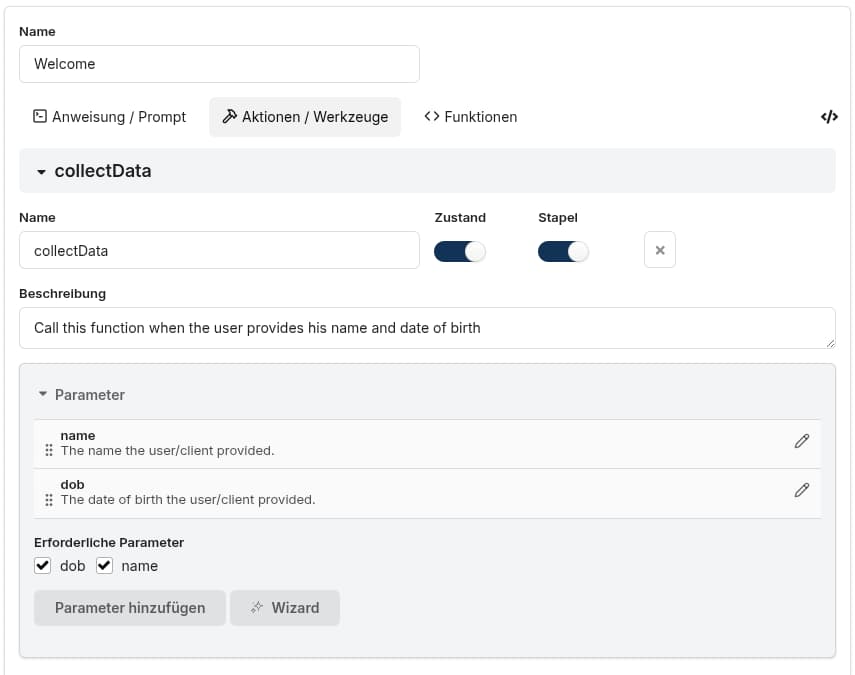
Greet the user and ask for their name and date of birth including the year.Next, in the Actions/Tools tab, we define a function collectData with the following parameters:
name as String and dob as Date. The function parameters should then be configured as follows:
In the Functions tab, we can now extend the empty JavaScript function collectData(params)
with the text the assistant should say when this function is called.
In our example, the assistant simply responds with "Danke!" and the name provided by the user/caller
after the name has been captured.
function collectData(params) {
    return { text: "Danke! " + params.name };
}
The params parameter contains all previously collected inputs from the caller/user as a JSON data structure.
{
    "name": "Max",
    "dob": "14.09.1989"
}
Test the single-stage assistant
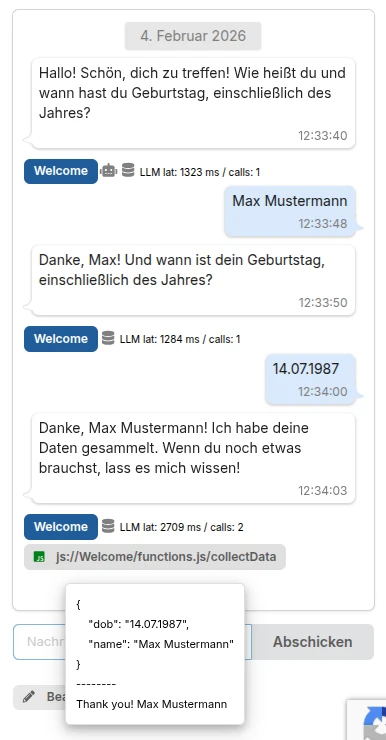
As the conversation shows, the assistant greets the caller and asks for their name and date of birth. Once the user/caller has provided the required information, the assistant responds with a thank you and repeats the given name.
You can also see the call to the collectData() function and the values of the params parameter,
which contain the data extracted by the AI from the conversation.
Bonus
In the example above, the assistant simply says what was returned as text in the collectData() function.
As shown, the conversation took place in German. If you want the LLM to independently formulate a response in the right
language, you can return a data field instead.
function collectData(params) {
    return { data: "Thank the user and mention their name." };
}
Multi-Stage/Prompt-Bot
This time we split the bot above so that the Welcome stage only asks for the name, and the next stage only asks for the date of birth.
First, we define/use the Welcome stage and set the following prompt:
You are an AI assistant that collects some user/customer data.
You respond in German.
You respond briefly and in a very friendly, conversational style.
Answer any question that is outside the purpose of collecting the customer's name and date of birth with: I don't know.
Do not invent any answers.

Greet the user and ask only for their name.
Note that we shortened the instruction to only the name request, but not the date of birth, because that information is collected in the second stage after we successfully gather the name and transition to the next stage.
We then add a second stage and call it Stage DOB, but leave it empty for now.
Next, in the Actions/Tools tab, we define a function collectName with the parameter name as string
and provide an appropriate description.
The tools should then be configured as follows:
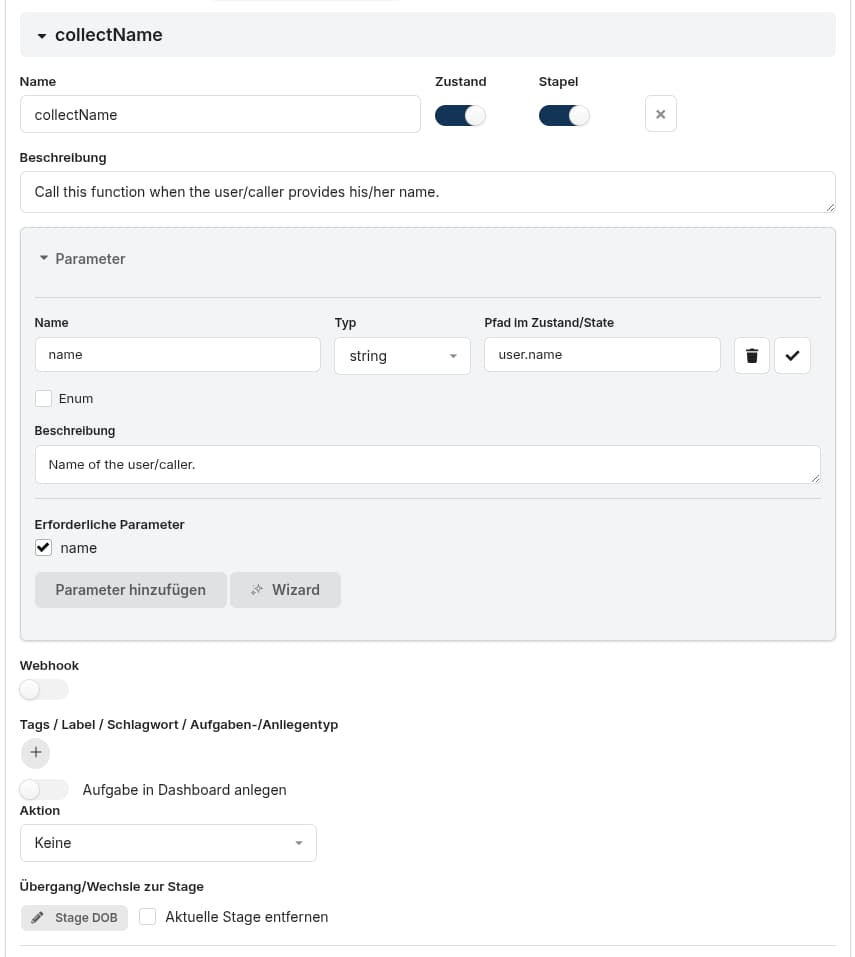
Note that we also define a key/path (path in state) where the collected information, i.e., the name, should be stored in the state.
And we define a transition to the previously created Stage DOB stage because we want to collect the date of birth next.
For this stage, we use a very short prompt because the LLM should only ask the caller for their date of birth at this point.
Ask the caller for their date of birth.Finally, we define the actions/functions for the DOB stage as follows:
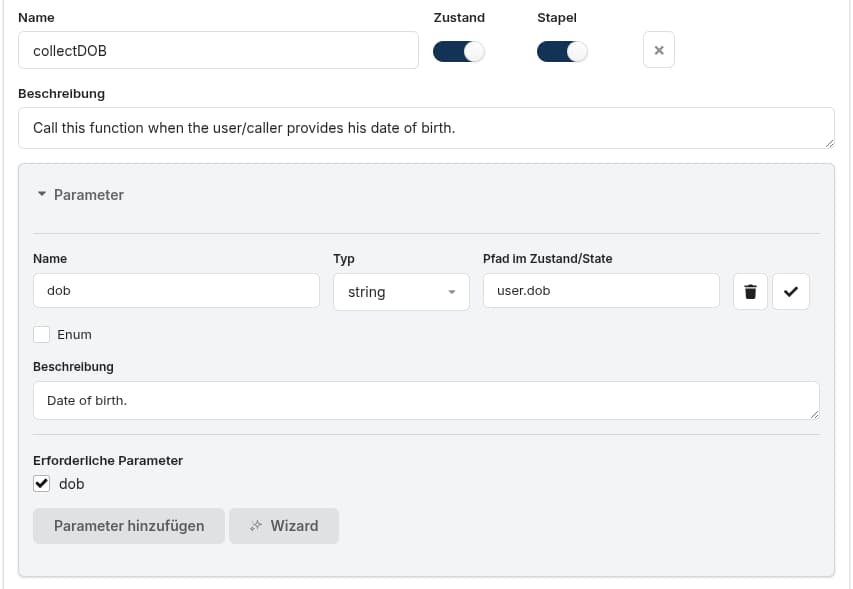
Then we implement the collectDOB function we defined in the Actions/Tools section. In our example, we simply respond with "Danke!" and hang up.
function collectDOB(params) {
    return { text: "Danke!", action: "hangup" };
}
Test the multi-stage bot
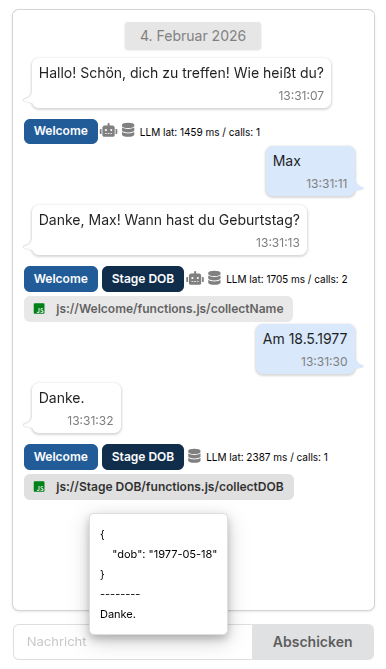
As the conversation shows, the assistant greets the caller and asks for their name.
After the caller provides their name, the collectName function is called and triggers the transition to Stage DOB.
In this stage, the LLM asks the caller for their date of birth as defined in the prompt.
Finally, the collectDOB function is called with the data provided by the caller.
In debug mode, you can see which stage the assistant is currently in, as well as the current state, the last prompt, and the extracted data/variables, etc.
Execution order: prompt and function calls
During execution, the return values/data from the function calls and the prompt of the next stage are combined by the LLM into a single response followed immediately by the next question: