

Webhooks
Webhooks allow the assistant to interact with external systems and integrate them into your workflow. With webhooks, the assistant can either retrieve up-to-date information (e.g. customer data, available products, or free appointment slots) or send/submit collected information (e.g. after a user completed a transaction/booking).
How To Configure Webhooks
Webhooks can be configured directly within a function/action by toggling the webhook switch and providing the Webhook URL as shown below:
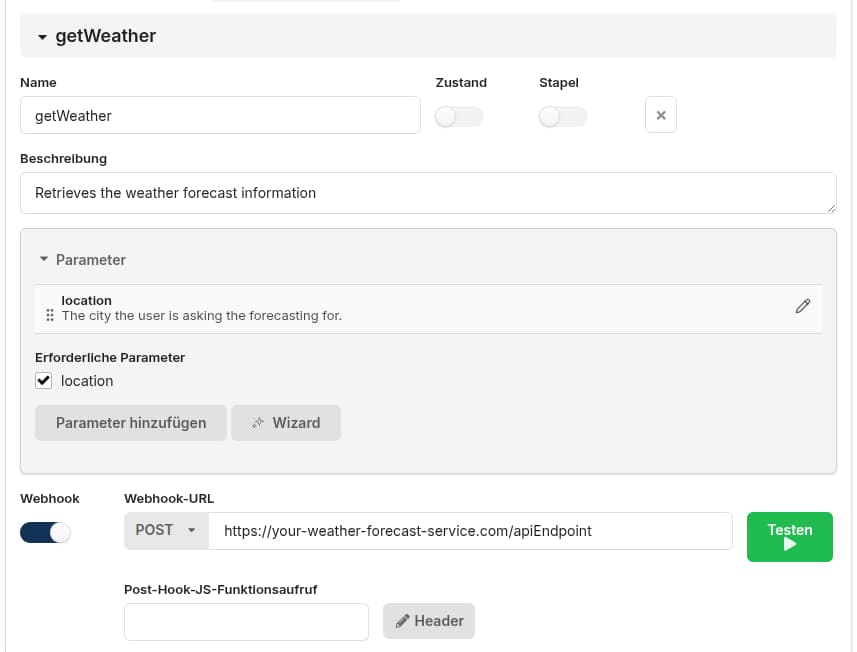
The voice bot will then send the extracted parameters as the request body in a POST request.
Post Processing
If the webhook is used to retrieve data, it is sometimes necessary to transform the data, e.g. filter items or format values.
If post processing is needed, the Post hook JS function call field can be used to specify the name of a function that should be called right after the webhook retrieved the data.
The function parameter will be the webhook response body: a nested JSON object if the body is valid JSON; otherwise a string (if the body could not be parsed as JSON).
Programmatic Execution Of Webhooks
Webhooks can also be executed programmatically from any JavaScript code snippet at any time as follows:
function myFunction(params) {
    response = webhook("https://mydomain.com/apiEndpoint", {"sample": "data"});
    return response;
}
Examples
Send a JSON body with a custom request header:
webhook("https://httpbingo.org/json", {"test": "hello world"}, {
    headers: {"Token": "xyz"}
});
Return the complete response, including the response headers, by setting raw to true:
const raw = webhook("https://httpbingo.org/json", {"test": "hello world"}, {
    headers: {"Token": "xyz"},
    raw: true
});
log(raw);
Send URL-encoded form data by providing a string body and setting the content type:
webhook("https://httpbingo.org/post", "test=we343", {
    headers: {"Content-Type": "application/x-www-form-urlencoded"}
});
Call endpoints that return an HTTP error status, such as 500 or 404:
webhook("https://httpbingo.org/status/500");
webhook("https://httpbingo.org/status/404");
Set a request timeout in seconds:
webhook("http://127.0.0.1:9999/timeout", {timeout: 3});Parameters
| Parameter | Description |
|---|---|
| url | The URL including all GET parameters that should be called |
| body | The body/a JavaScript object which will be sent as the body in POST/PUT requests |
| options (Optional) | method: "get"|"put"|"post"|"delete"|"head" |
| options (Optional) | headers: an object containing additional HTTP request headers |
| options (Optional) | ttlCache: 0 (if the request should be cached) |
| options (Optional) | raw: true|false - if response headers should also be returned |
| options (Optional) | timeout: the request timeout in seconds |