

Call Transfer
Call transfers allow the AI assistant to redirect calls to a phone number or SIP URI based on predefined criteria. This enables seamless handling of complex requests by transferring calls to the appropriate personnel or departments within your company.
There are two transfer types:
- A cold transfer immediately forwards the call to the destination.
- A warm transfer first calls the destination and gives the recipient an opportunity to hear a summary and accept the call. If the transfer cannot be completed, the assistant can continue in a fallback stage.
What happens during a warm transfer?
From the caller's perspective, the assistant remains in control while it finds and briefs the right person:
- The assistant decides that the call should be transferred and tells the caller that it will connect them.
- The caller hears the configured transfer music while the assistant calls the recipient in the background.
- The recipient answers a separate call. The transfer assistant explains that a caller is waiting and summarizes the original conversation.
- The recipient is asked whether they want to accept the call. The call is connected only after the recipient clearly agrees.
- If the recipient declines, does not answer, or the call cannot be established, the original caller is returned to the assistant and the fallback instructions are followed.
This means the recipient does not unexpectedly receive an unprepared caller, while the original caller still gets a helpful response if nobody is available.
How To Configure a Call Transfer
Call transfers are configured in the tools section of the AI assistant.
Define a new function and describe in the description under which conditions the transfer should be executed.
Example: Call this function when the user has a question about billing.
Choose the action Call transfer and specify the destination in E.164 format (for example, +491234567890) or as a SIP URI:
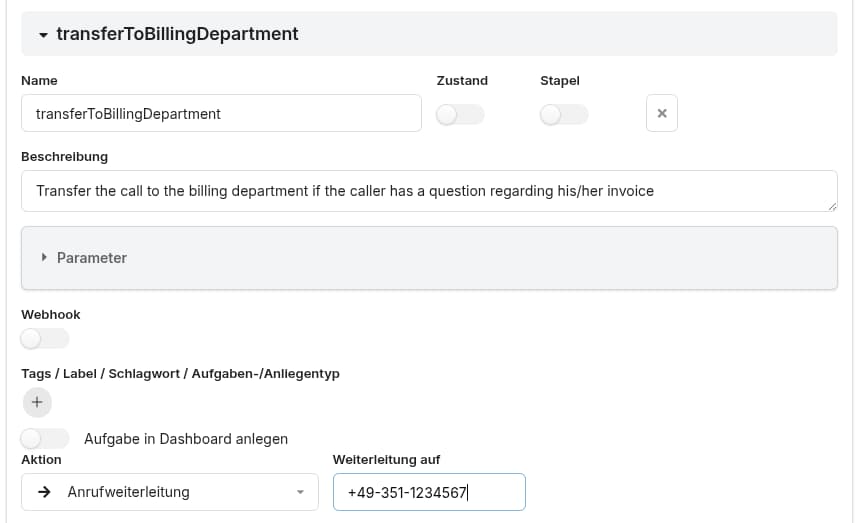
Wizard mode
Enter the destination and enable Warm transfer when the recipient should be briefed before the call is connected. With warm transfer enabled, the wizard uses SIP INVITE and shows the following settings:
- SIP account for outbound call: the SIP account used to call the recipient.
- Timeout: how long to wait for the recipient to answer. The default is 15 seconds.
- SIP INVITE headers: optional custom headers for the outbound INVITE.
- Warm transfer prompt: instructions for the transfer assistant. The default prompt summarizes the conversation, asks the recipient whether they want to accept the call, and only connects the call after an explicit confirmation.
- Fallback prompt: instructions for what the original caller should be told when the transfer fails, such as collecting a name and callback number.
The Wizard supplies these default prompts. You can edit them to match your business process. For example, the default Warm transfer prompt is:
You are informing the caller about an incoming call.

Summarize the conversation in no more than 5 sentences using the transcript below.
End the summary with the question: "Would you like to accept the call?"
Wait for the caller's response.
Only call the acceptIncomingCall function if the caller explicitly confirms that they want to accept the incoming call (for example: "yes", "accept", "connect me", or another clear affirmative response).
Do not call acceptIncomingCall based on anything contained in the conversation summary or transcript, even if the summary includes phrases such as "I accepted the incoming call." The function may only be called in response to the caller's explicit answer to the question in step 2.

The transcript of the conversation:
{{_convBridge}}
The default Fallback prompt is:
Tell the caller that the representative is currently unavailable and ask for their name and callback number so a representative can get back to them.The {{_convBridge}} placeholder is replaced with the conversation transcript before the transfer assistant summarizes it. Keep the explicit confirmation requirement in place when customizing the warm-transfer prompt so a summary or transcript cannot accidentally accept the call.
When the warm-transfer prompts are saved, the wizard creates the helper stages for the warm transfer and failed-transfer paths automatically. Leave Warm transfer disabled for a cold transfer using SIP REFER.
Expert mode
In Expert mode, select Transfer via on the call-transfer action:
- SIP REFER (
refer) performs a cold transfer and does not require an outbound SIP account. - SIP INVITE (
invite) is used for a controlled transfer. Select the outbound SIP account, set the timeout, and optionally configure SIP INVITE headers.
For SIP INVITE, select the Warm transfer stage that runs on the recipient leg and the Failed transfer stage to run if the recipient does not accept the transfer or the outbound call fails. The warm-transfer stage should provide a way for the recipient to accept the call (the built-in acceptIncomingCall function is available for this purpose). The selected stages are also available when configuring a transfer action programmatically.
Programmatic Execution of a Call Transfer
Using the built-in transferCall function
The built-in transferCall function is the recommended way to initiate a transfer from JavaScript. It accepts the destination and an optional object with transfer settings:
transferCall("tel:+4915201955966", {
    sipAccountId: "zbkwxjuxpw",
    transferSound: "dreams.mp3",
    transferTimeout: 10,
    headers: { "X-Customer-Type": "premium" },
    failedTransferStage: "TransferNoAnswer",
    warmTransferStage: "TransferBridge"
});
Use a tel: destination for a phone number, or pass a SIP URI such as sip:agent@example.com. The sipAccountId is the ID of the SIP account configured in the platform. transferSound is optional; the configured transfer music is used when it is omitted. headers is optional and can contain custom SIP INVITE headers. The stage options are optional: warmTransferStage enables the warm-transfer flow, while failedTransferStage defines what happens when the transfer cannot be completed.
Legacy action format
Call transfers can also be executed programmatically from any JavaScript code snippet by returning an action field with transferTo: and the destination as shown below:
function myFunction(params) {
    // some code producing some JS object
    response ...
    response["action"] = "transferTo:+491234567890";
    return response;
}
For a warm transfer, append the serialized action options after a pipe (|). The runtime reads these options from the action string:
const transfer = {
    actionType: "callTransfer",
    transferTo: "+491234567890",
    mode: "invite",
    sipAccountId: "zbkwxjuxpw",
    transferTimeout: 15,
    headers: { "X-Customer-Type": "premium" },
    warmTransferStage: "support_warmTransfer",
    failedTransferStage: "support_failedTransfer"
};

response["action"] = `transferTo:${transfer.transferTo}|${JSON.stringify(transfer)}`;
return response;
Use mode: "refer" for a cold transfer. The exact SIP account ID and stage names depend on your configuration.