

State
Introduction
Voice agents are often used to collect various data from customers, clients, or patients. For example, customers are asked for their name, date of birth, and the product they want to book or cancel, as well as their preferred time slot. Patients, on the other hand, may request prescriptions.
This data is usually collected via the defined actions/tools, where the parameters or variables contain the information the LLM extracted from the customer's responses.
To store this data between function calls and stages and to pass it to backend systems (e.g., CRM, ticketing, or PVS systems) via a webhook, there is a state object that is active for the entire call session and can be used to store and retrieve this information.
The State Object
The state object is a simple JavaScript object that can be used to store flat or nested information.
At the start of a call, the object already contains standard information such as the caller's phone number, provided they haven't suppressed it.
{
    "call": {
        "from": "+49-351-1234567",
        "to": "+49-351-7654321"
    }
}
No-Code Approach
Data collection happens during an action, i.e., a function call.
Therefore, you can define where the collected information should be stored in the state object directly in the actions/tools section of a function definition/configuration:
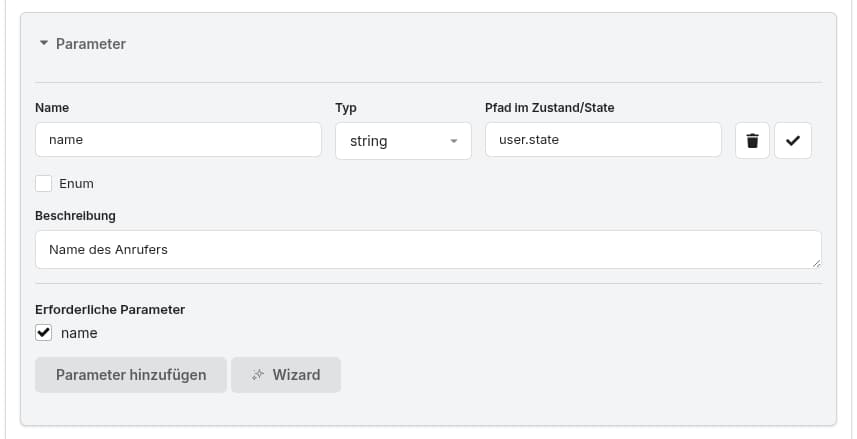
The key/path defines where the collected/extracted data is stored within the state object. Dot notation allows storing data in a nested structure.
Low-Code Approach
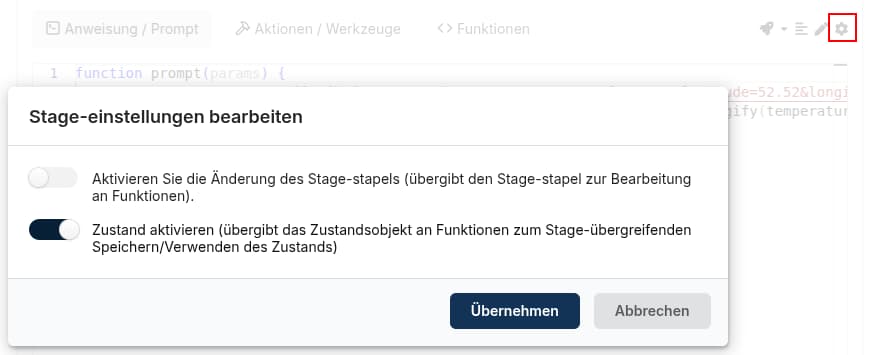
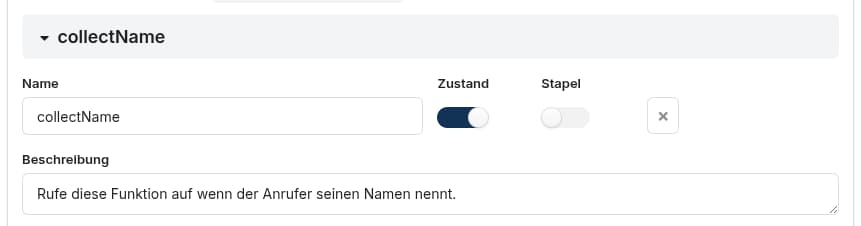
Enable State
To access the state object in a dynamic prompt or within a function call of an action/tool, the state must be explicitly enabled:
Enable for a prompt function
Enable for an action/tool function
Use/modify State
Example
Assume the function collectName captures a caller's name and provides it as a name field in the params object. You can then store that name in the state as follows:
function collectName(params) {
    if (!params["state"]["user"]) params["state"]["user"] = {};
    params["state"]["user"]["name"] = params["name"];
    return { state: params["state"] };
}
After the function executes, the state object contains the following information:
{
    "call": {
        "from": "+49-351-1234567",
        "to": "+49-351-7654321"
    },
    "user": {
        "name": "Max"
    }
}
Important: After any change, the modified state object must be returned - similar to the stack - otherwise the changes will not be visible in subsequent function calls and stages.